IDX Logo Transparent Background
Growth Automation

Solana Volume Bot Learn More

Choose the right bot landing, match an engine to your launch stage, fund on-chain automation, and monitor results β€” with clear notes on liquidity, cashback, and DexScreener visibility.

IDX volume bot illustration

Launchlab creator? Launch first, then boost.

Fair-launch on IDX Launchlab’s bonding curve, earn creator fees on every trade, then run a volume bot to accelerate chart activity. Claim earnings anytime from Rewards.

Launch coin

Track bots from your dashboard

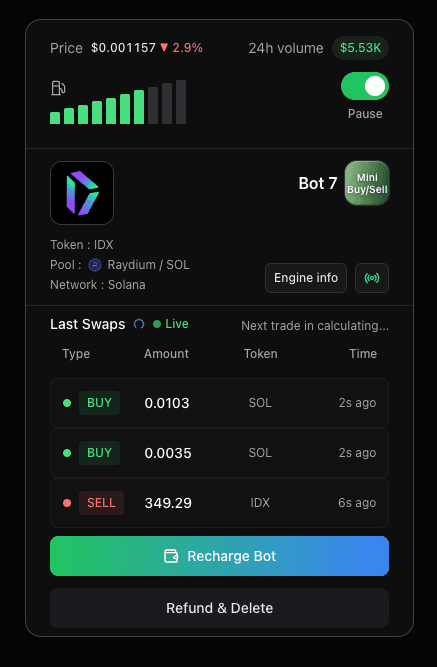
Start, stop, recharge, and refund gas from one place. Monitor engine status, trading pairs, and bot health without keeping a browser tab open β€” automation runs on-chain.

IDX AutoBot dashboard preview β€” Mini Buy/Sell bot card with gas level, last swaps, and controls

Built for Solana DEX visibility

Generate real on-chain volume across supported pools so your token shows stronger activity on DexScreener and discovery surfaces β€” paired with engines tuned for your budget.

IDX AutoBot dashboard preview

Watch How It Works

See IDX AutoBot in action

Multi-pool Solana volume β€” Pump.fun, Raydium, Orca, and Meteora
Real volume across supported Solana DEX pools.
Solana volume bot overview
Multi-DEX volume automation from a single Create Bot flow.
IDX Launchlab β€” create your crypto coin on Solana
Launch on IDX Launchlab, then boost with the IDX bot landing.

Who should use this tool

  • - Token founders launching on Solana
  • - IDX Launchlab creators boosting curve activity
  • - Growth teams sustaining volume after pool graduation

Primary use case

A practical guide to IDX volume bots: choose a general or DEX-specific landing, pick engines (V4–V12), understand IDX Launchlab creator fees and Pump.fun cashback, and run campaigns with realistic expectations.

Best fit use cases

Launch windows, relaunch visibility pushes, post-graduation chart activity, and sustained on-chain volume when you already have baseline liquidity and a clear narrative.

IDX Launchlab + volume bot

Launch on IDX Launchlab, then boost with the IDX bot landing. Bot trades generate real swaps on your mint β€” creator fees accrue per platform config and are claimable from Rewards.

What to avoid

Avoid heavy spend on weak or illiquid pools, running bots without a public landing page ready, or expecting guaranteed fills or trending from automation alone.

Campaign hygiene

Set budget expectations upfront, run a short validation window, assign someone to monitor the dashboard daily, and communicate transparently with your community.

Which engine should you pick?

Engines differ in trade frequency, maker count, and SOL spend. Match activity level to where your token is in its lifecycle β€” you can run up to three engines on one launch.

V12 β€” top ranking

Highest volume (~4 SOL/hr, ~15000 SOL/day, 19000+ makers, trades instantly). Best for aggressive ranking pushes; pairs with Mini Buy/Sell (~72 SOL first charge).

V8 β€” aggressive visibility

High activity (~0.5 SOL/hr, ~3000 SOL/day, 2000+ makers, trades every 15–30 sec). Best for launch windows, hype phases, and post-graduation visibility pushes.

V6 β€” trending momentum

Mid-tier cadence (~0.15 SOL/hr, ~350 SOL/day, 700+ makers, trades every 1–5 min). Steady DexScreener activity before or after graduation without V8 spend.

V4 β€” light organic boost

Budget-friendly prints (~0.03 SOL/hr, ~100 SOL/day, 125+ makers, trades every 10–15 min). Best for early curve, testing spend, or tokens with thin liquidity.

V4 Eco β€” lower hourly burn

Same trade cadence as V4 (~10–15 min) at ~0.025 SOL/hr (~80 SOL/day, 125+ makers). Useful when you want V4-style flow with tighter gas.

Mini Buy/Sell β€” dense two-sided flow

Alternating micro buys and sells (~30 swaps/min, ~0.30 SOL/hr). Busier two-sided chart; pairs well with V12 or V8 for layered momentum.

Mini Buy β€” bid-side depth

Buy-side only β€” rapid micro purchases (~0.1 SOL/hr, ~10 swaps/min) that stack bid depth and tx count without alternating sells. Pair with V12 or V8 when you want buys plus two-sided flow.

How it works

1) Step

Pick the landing that fits your token β€” general hub, DEX-specific page, or IDX Launchlab bot.

2) Step

Connect wallet, paste mint address, and confirm token symbol.

3) Step

Select up to three engines (V12, V4, V4 Eco, V6, V8, Mini Buy, Mini Buy/Sell) for your budget and stage.

4) Step

Recharge in SOL, start from dashboard, monitor trades, and stop or refund unused gas anytime.

Decision checklist

  • - Token mint is verified and trades on a supported pool or Launchlab route.
  • - Correct bot landing is selected (general, DEX-specific, or IDX Launchlab).
  • - Engine choice matches budget and launch stage (V4/V6 vs V8/V12/Mini).
  • - Landing page, socials, and narrative are ready before visibility spikes.
  • - Dashboard owner assigned to monitor spend and bot health daily.

Risk and trust notes

  • - Volume automation does not guarantee price action, bonding curve completion, or exchange listings.
  • - Set recharge limits you are comfortable losing to gas and slippage before scaling spend.
  • - Verify mint address and pool support before funding β€” wrong mint or unsupported routes waste SOL.
  • - Stop bots and refund unused gas from the dashboard when pausing a campaign.

FAQ

Which Solana pools does IDX support?

IDX volume bots work with Pump.fun, Raydium, Orca, Meteora, IDX Launchlab (Raydium LaunchLab), Moonit, FluxBags, Bags, and related routes. Pump.fun, Raydium, Orca, Meteora, and IDX Launchlab each have dedicated bot landings; other venues use the general /volume-bot hub.

Does a volume bot guarantee DexScreener trending or rankings?

No. Volume bots increase on-chain trading activity and transaction count, which teams use alongside marketing for discovery visibility. Rankings depend on broader market demand and competition.

Which landing page should I use?

Use the general hub for multi-DEX tokens. Use a DEX-specific page when your token primarily trades on one venue (Pump.fun, Raydium, Orca, or Meteora). Use the IDX Launchlab bot if you launched on IDX Launchlab and want copy and cashback details tailored to that flow.

How does IDX Launchlab cashback differ from Pump.fun?

IDX Launchlab creators earn fixed creator fees on trades (0.5% on the bonding curve, then ongoing pool fees via a Fee Key NFT after graduation). Pump.fun uses market-cap-tier bot fee rebates on its fee program. Both panels are shown on their respective bot landings when you configure engines.

Do I need liquidity before starting a volume bot?

Your token should trade on a supported pool or route. For fresh launches, create or graduate liquidity first, then paste the mint and fund the bot.

Can I run multiple engines at once?

Yes. Select up to three engines on one launch β€” IDX creates one bot per engine (V12, V4, V4 Eco, V6, V8, Mini Buy, Mini Buy/Sell, etc.) with the same mint and settings.

What should I monitor during a campaign?

Track SOL spend pace, bot status on your dashboard, transaction health, and market response. Pause and refund unused gas if activity or ROI is off target.