IDX Logo Transparent Background
Telegram Mini App

IDX Telegram Volume Bot Learn More

Open @IDX_AutoBot in Telegram for a real mini app: mint → pool → engine → launch. Same IDX volume engines as the web dashboard, live pool stats, bot cards with recent trades, and built-in AI support — without memorizing slash commands.

Strong ranking setup: V12 + Mini Buy/Sell

Run V12 for volume and makers, plus Mini Buy/Sell for dense micro trade activity on the same token. The web dashboard tip and volume bot guide explain why teams stack engines this way.

Volume bot strategy guide

Paste mint, pick pool — done in taps

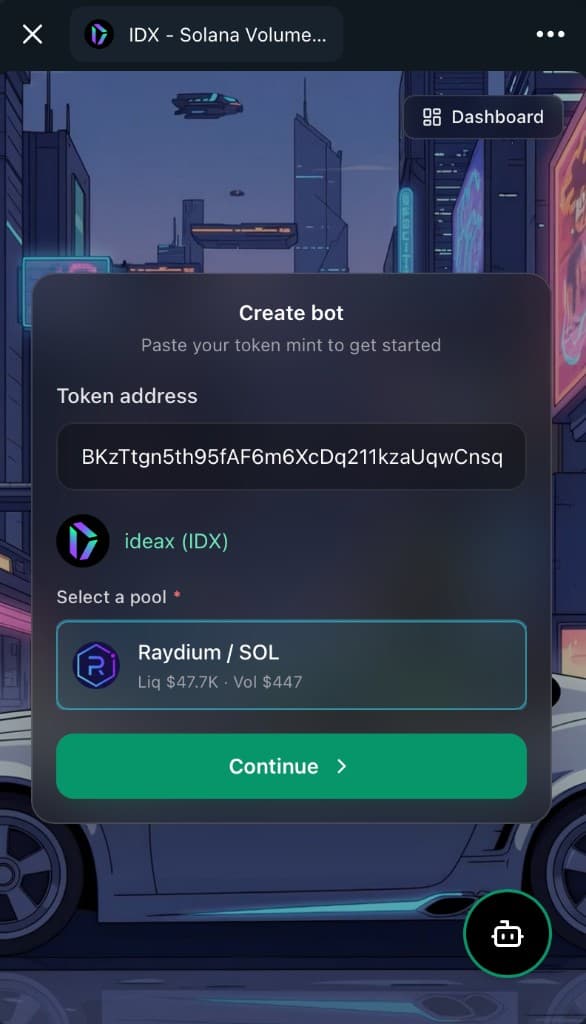
Enter an SPL mint or pool address and the Mini App resolves token name, symbol, and logo. Select from detected pools with live liquidity and volume — Raydium / SOL, Pump.fun routes, and more — before you choose an engine.

IDX Telegram Mini App create bot screen — token mint detected with Raydium pool selection and live liquidity stats

Compare engines with live trade previews

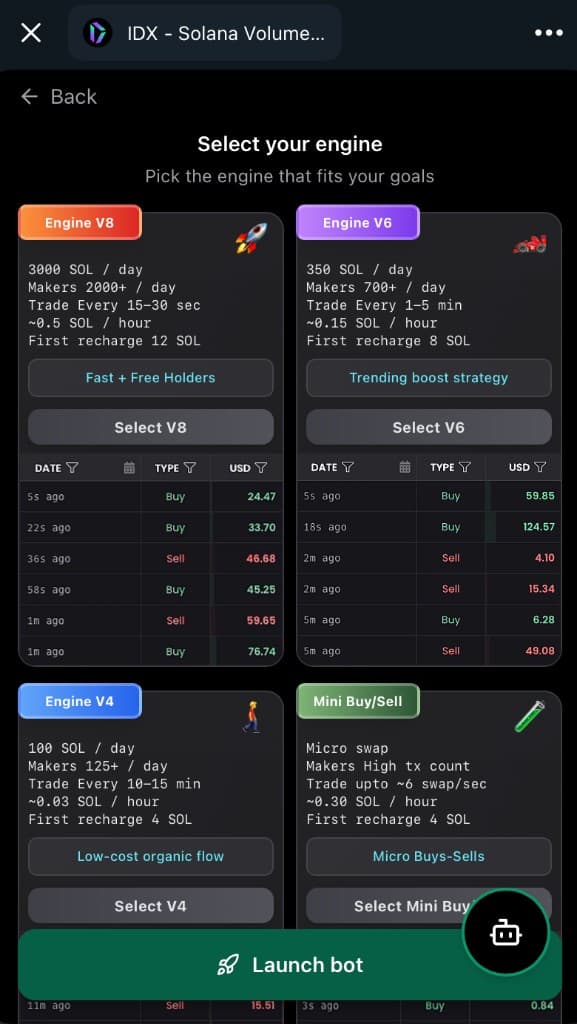
V12, V8, V6, V4, Mini Buy, and Mini Buy/Sell cards show volume targets, maker counts, trade frequency, hourly SOL cost, and recent buy/sell activity — so you pick the right strategy without guessing from a text menu.

IDX Telegram Mini App engine picker — V12, V8, V6, V4, Mini Buy, and Mini Buy/Sell cards with stats and live trades

Dashboard and controls inside Telegram

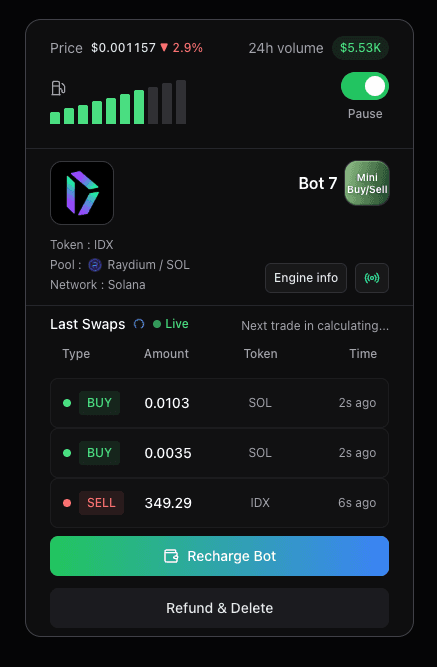
Jump to Dashboard from any screen. Bot cards show gas level, engine type, pair, recent swaps, and actions to recharge or stop — the same operational view as the web product, optimized for Telegram.

IDX Telegram Mini App bot card — Mini Buy/Sell with live swaps, gas level, and recharge controls
IDX Solana Volume Bot Telegram profile — 50,000+ monthly users
Trusted by tens of thousands of Telegram users every month.
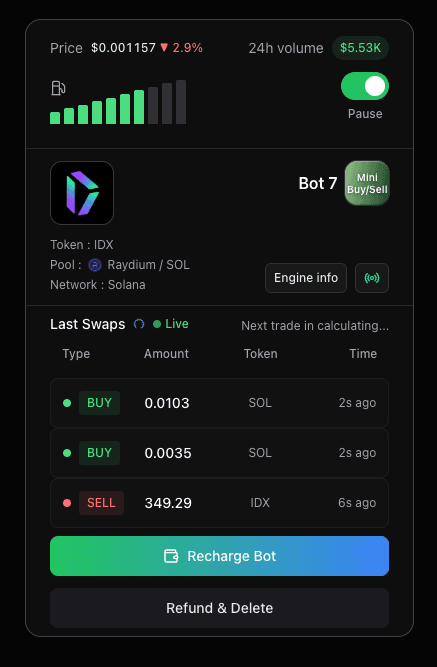
IDX Telegram Mini App bot card — Mini Buy/Sell on Raydium with live swaps, gas level, and recharge controls
Manage bots from Telegram — live trades, gas, pause, and recharge on one card.
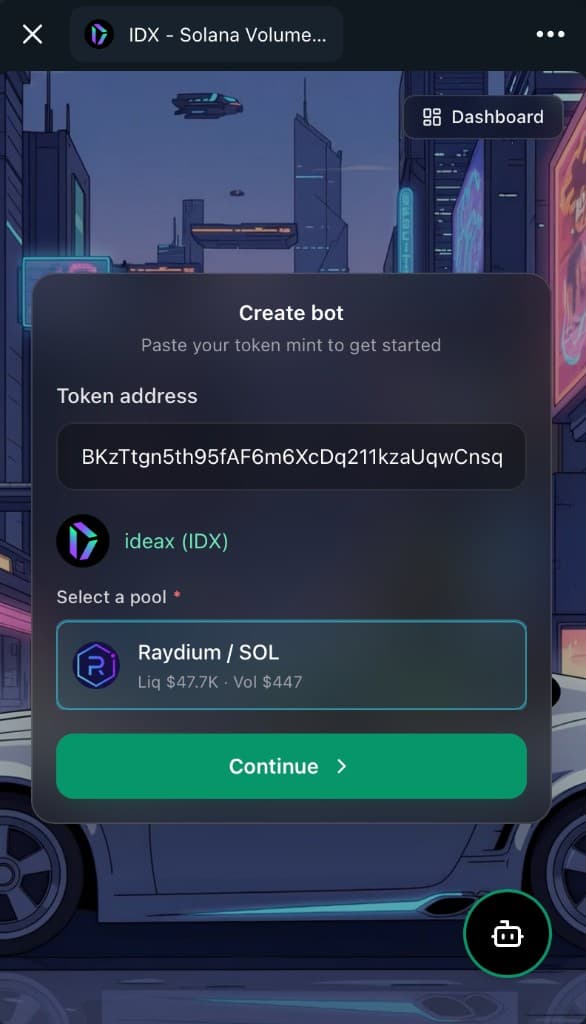
Telegram Mini App create bot — SPL mint with Raydium pool selected and live liquidity stats
Paste mint, confirm token, pick pool — then continue to engine selection.

Who should use this tool

  • - Solana founders who want to launch or monitor volume bots from their phone
  • - Growth teams that live in Telegram and need a visual bot dashboard, not chat commands
  • - Traders managing V12, V8, V6, or Mini Buy/Sell campaigns while away from desktop
  • - Projects pairing Telegram community ops with on-chain volume automation

Primary use case

IDX Telegram Volume Bot is a full Telegram Mini App for Solana — not a text-only command bot. Paste an SPL mint, auto-detect token metadata and liquidity pools, pick V4–V12 or Mini Buy/Sell engines, launch bots, and manage your dashboard from Telegram on mobile or desktop.

Not a boring chat bot

Most Telegram crypto bots are text menus and opaque replies. IDX AutoBot is a native Mini App — rich UI, pool detection, engine comparison cards with live stats, and a dashboard you would expect from a web product, running inside Telegram.

Mobile-first volume automation

Launch windows do not wait for you to reach a laptop. Paste a mint on your phone, pick V12, V8, or Mini Buy/Sell, fund in SOL, and watch recent trades stream on the bot card while you manage community chat in the same app.

Transparent engine choice

Each engine card shows daily volume targets, maker counts, trade frequency, and hourly SOL cost before you commit. Compare V12 top rankings vs V8 aggressive flow vs V6 trending vs V4 organic vs Mini Buy/Sell micro swaps side by side.

Same IDX stack as the web

Telegram is a front door — not a stripped-down clone. Bots, gas, refunds, and on-chain execution use the same IDX infrastructure as the browser dashboard, so you can switch between phone and desktop without reconfiguring.

Engines in the Telegram Mini App

Pick the engine that matches your launch stage and budget. The Mini App shows live activity previews on each card so you know what you are buying before Launch bot.

V12 — top ranking

~15000 SOL/day, 19000+ makers/day, trades instantly. Best for aggressive ranking pushes (~4 SOL/hr); pairs with Mini Buy/Sell.

V8 — fast volume + makers

~3000 SOL/day volume, 2000+ makers/day, trades every 15–30 seconds. Best for launch windows and post-graduation visibility pushes (~0.5 SOL/hr).

V6 — trending momentum

~350 SOL/day, 700+ makers/day, trades every 1–5 minutes. Steady DexScreener activity without V8 hourly spend (~0.15 SOL/hr).

V4 — low-cost organic flow

~100 SOL/day, 125+ makers/day, trades every 10–15 minutes. Budget-friendly prints for early curve or thin liquidity (~0.03 SOL/hr).

Mini Buy/Sell — micro swap density

Alternating micro buys and sells — ~30 swaps/min. Pairs with V12 or V8 for layered chart activity and higher transaction count (~0.30 SOL/hr).

Mini Buy — bid-side depth

Buy-side only — rapid micro purchases (~0.1 SOL/hr, ~10 swaps/min) that stack bid depth and tx count without alternating sells. Pair with V12 or V8 when you want buys plus two-sided flow.

How it works

1) Step

Paste your SPL token address or pool — the Mini App auto-detects the token, symbol, and eligible pools with live liquidity and volume.

2) Step

Select your engine — V12, V8, V6, V4, Mini Buy, or Mini Buy/Sell — and compare volume targets, trade frequency, and hourly SOL cost on each card.

3) Step

Recharge in SOL, launch the bot, then come back anytime to monitor gas, live swaps, and status from your phone.

Decision checklist

  • - Token mint is verified and trades on a supported pool.
  • - Correct pool is selected with adequate liquidity for your engine tier.
  • - Engine choice matches budget (V4/V6 vs V8/V12/Mini Buy/Sell).
  • - Landing page, socials, and narrative are ready before visibility spikes.
  • - Someone is assigned to monitor gas and bot health from Telegram or web.

Risk and trust notes

  • - Volume automation does not guarantee price action, bonding curve completion, or exchange listings.
  • - Set SOL recharge limits you are comfortable losing to gas and slippage before scaling.
  • - Verify mint address and pool support in the Mini App before funding.
  • - Pause bots and refund unused gas from the dashboard when a campaign ends or ROI is off target.

FAQ

Is IDX AutoBot just a Telegram chat bot with commands?

No. IDX AutoBot opens a full Telegram Mini App with a visual UI — create flows, engine cards, pool pickers, dashboards, and live trade feeds. You tap buttons and forms instead of typing slash commands or parsing bot replies.

Does the Telegram bot use the same engines as the web volume bot?

Yes. V12, V4, V4 Eco, V6, V8, Mini Buy, and Mini Buy/Sell are available in the Mini App with the same on-chain automation as tools.idxsolana.io. Strong ranking setups often pair V12 with Mini Buy/Sell on the same token.

Which Solana pools work in the Telegram Mini App?

Supported routes include Pump.fun, Raydium, Orca, Meteora, IDX Launchlab, and related pools. Paste your mint and the app lists eligible pools with liquidity and volume so you pick the right pair before launch.

Can I manage bots from my phone?

Yes. The Mini App dashboard shows bot cards with gas level, engine type, pair, recent buys and sells, and controls to recharge, pause, or refund unused gas — optimized for Telegram on mobile.

How do I open the bot?

Go to t.me/IDX_AutoBot in Telegram (mobile or desktop), tap Start, then open the Mini App from the menu or inline button. No separate app install — it runs inside Telegram.

Is there AI support inside Telegram?

Yes. A support button in the Mini App opens IDX AI help for volume bot questions, engine choice, and troubleshooting — without leaving Telegram.

Does a volume bot guarantee DexScreener trending?

No. Volume bots increase on-chain activity and transaction count, which teams combine with marketing for discovery. Rankings depend on market demand, competition, and broader visibility — not automation alone.

Use these IDX Solana tools together to launch and manage your token.